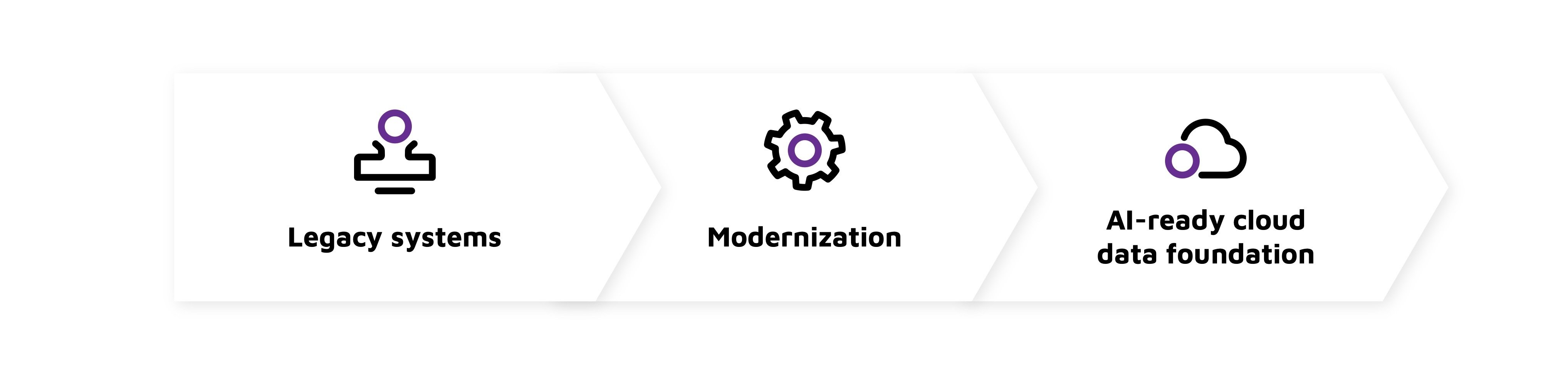
Legacy data systems can limit AI because data is often fragmented, hard to govern, and slow to use. A practical modernization strategy turns migration into a business-led path toward trusted cloud data, stronger governance, faster analytics, and scalable AI use cases. The goal is not just to move systems, but to create an AI-ready foundation that reduces risk, improves decision-making, and supports long-term modernization.
Key takeaways
-
AI modernization should start with business outcomes, not platform selection.
-
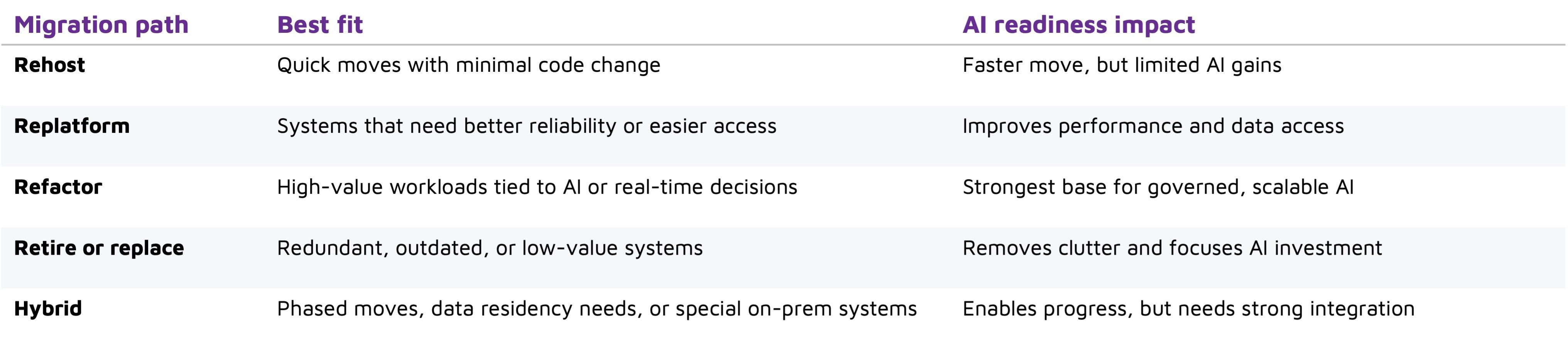
Cloud migration works best when each workload follows the right path: rehost, replatform, refactor, replace, retire, or keep hybrid.
-
Data integrity depends on profiling, mapping, validation, reconciliation, and post-cutover monitoring.
-
AI-ready architecture requires governed pipelines, scalable compute, reliable metadata, and secure access patterns.
-
The real value of migration appears when modernization continues after cutover through automation, optimization, and better data access.
What does it take to modernize legacy data systems for AI?
Modernizing legacy data systems for AI means more than copying old databases into a new environment. It requires assessing what data exists, where it lives, how it is used, and what must change so AI tools can access trustworthy, well-governed information at the right speed. The goal is to turn fragmented legacy assets into a flexible cloud-based data ecosystem that supports model training, analytics, automation, and secure operational use.
For many organizations, this starts with a practical cloud migration process. Teams identify critical applications, map dependencies, clean and validate data, choose migration methods, and redesign selected systems for cloud-native performance. Some workloads may move quickly through lift-and-shift migration, while others need deeper refactoring before they can support AI effectively.
Start with the business case, not the platform
It is tempting to begin by comparing providers or buying cloud migration tools. Those choices matter, but they should come after the business case. AI modernization is strongest when it is tied to specific outcomes: faster forecasting, better customer segmentation, automated document processing, fraud detection, predictive maintenance, or more efficient internal reporting.
A clear business case helps teams decide which data deserves priority. Not every legacy system should be moved immediately, and not every application needs to be rebuilt. Some systems may only need secure integration with a cloud data platform, while others may be retired because they duplicate functions that already exist elsewhere.
Useful questions at this stage include:
-
Which AI or analytics use cases will create the most value?
-
Which legacy systems contain the data needed for those use cases?
-
What data quality, latency, privacy, or access issues block progress today?
-
Which applications are too risky, costly, or complex to move first?
-
What compliance, retention, and security requirements must remain intact?
This early discipline prevents cloud service migration from becoming a technical exercise with unclear returns. It also gives cloud migration experts a sharper target: design the migration around business value, not around infrastructure for its own sake.
Choose the right cloud migration strategy for each workload
There is no single best migration path for every legacy data system. A practical cloud migration strategy uses different approaches depending on the workload’s age, complexity, business value, and AI readiness. The most common options are often described as rehosting, replatforming, refactoring, repurchasing, retiring, and hybrid migration.
Match cloud migration tools to the job
Cloud migration tools can support discovery, data transfer, schema conversion, validation, monitoring, and security. They help teams move faster, but the best tool still depends on the workload, downtime tolerance, data sensitivity, and level of redesign required.
Tools are helpful, but they are not a substitute for judgment. Legacy environments often contain undocumented workflows, custom reports, brittle integrations, and business rules hidden in stored procedures or application code. Cloud migration experts can interpret those details, test assumptions, and prevent automated migration from carrying old problems into a new platform.
How do you protect data integrity during the cloud migration process?
You protect data integrity by treating migration as a controlled, testable workflow rather than a one-time transfer. That means profiling source data, mapping schemas, validating transformations, reconciling record counts, testing application behavior, monitoring replication, and confirming that users can access accurate data after cutover. Integrity checks should happen before, during, and after migration.
A dependable process usually includes these steps:
-
Inventory and classify data: Identify sensitive data, critical tables, owners, retention rules, and downstream users.
-
Map dependencies and rules: Document applications, reports, APIs, permissions, schemas, and required transformations.
-
Test and validate: Run pilot migrations, compare source and target records, and confirm business-critical reporting accuracy.
-
Plan cutover and monitor: Prepare rollback procedures, track errors, resolve access issues, and validate performance after launch.
For AI readiness, validation should go beyond “did the data arrive?” Teams should also ask whether the migrated data is complete enough for analytics, labeled or structured where needed, accessible through governed pipelines, and usable by data scientists without creating security shortcuts.
Build an AI-ready cloud data architecture
Once core systems are migrated, modernization should continue. AI needs more than storage. It needs reliable ingestion, metadata, governance, scalable compute, experimentation environments, and secure access patterns. For example, Lingaro + Microsoft Fabric for CPG analytics can connect modernization work to clearer business outcomes such as faster reporting, better forecasting, and more trusted decision-making.
An AI-ready architecture often includes a central data lake or lakehouse for raw and curated data, managed warehouses for analytics, streaming services for real-time events, and orchestration tools for repeatable pipelines. It may also include feature stores, vector databases, model registries, API gateways, and monitoring for model and data drift. The exact stack varies, but the principle is consistent: data should be discoverable, governed, and usable without constant manual extraction.
Modern development practices also matter. CI/CD helps teams release data pipelines and application changes safely. Infrastructure as code makes environments repeatable. Serverless services can reduce operational overhead for event-driven workloads. Microservices can help isolate business capabilities that were previously buried inside a single legacy application.
Cloud migration benefits show up after modernization continues
The biggest cloud migration benefits rarely come from relocation alone. They appear when organizations use migration to simplify operations, improve resilience, strengthen security, and make data more useful. Managed services can reduce infrastructure maintenance. Autoscaling can support changing workloads. Backup and disaster recovery services can improve continuity. Identity, encryption, and audit controls can strengthen governance when implemented well.
For AI teams, the value is practical. Instead of waiting weeks for extracts from legacy systems, they can work from governed data pipelines. Instead of building models on stale or incomplete datasets, they can access fresher and more consistent information. Instead of running experiments on constrained infrastructure, they can scale compute resources around the workload.
Cost impact should be managed carefully. Cloud can reduce capital spending and remove some hardware burdens, but poor architecture can create unexpected bills. Storage duplication, overprovisioned compute, unmanaged data egress, and idle test environments can erode returns. Strong tagging, cost monitoring, workload scheduling, and rightsizing should be part of the migration plan from the beginning.
What should your modernization roadmap include?
Your roadmap should define priority workloads, target architecture, migration methods, tool choices, governance requirements, testing plans, cost controls, and post-migration optimization. It should be specific enough to guide execution but flexible enough to adapt as teams uncover hidden dependencies.
To keep momentum, define success in business and technical terms. That may include improved data accessibility, shorter analytics cycles, better system resilience, reduced manual maintenance, stronger governance, or readiness for specific AI initiatives. The clearer the outcome, the easier it is to choose the right cloud migration solutions and avoid unnecessary complexity. In that context, Lingaro Migration Factory can help frame migration as modernization made executable rather than a one-time platform move.
Conclusion
Modernizing legacy data systems for AI is a strategic shift, not a simple infrastructure move. The right cloud migration process helps organizations protect data integrity, reduce disruption, and create a foundation where analytics and AI can grow responsibly. Start with business priorities, choose the right migration strategy for each workload, use cloud migration tools wisely, and keep improving the architecture after cutover.
AI value depends on trusted, accessible, well-governed data. Cloud service migration can provide that foundation, but only when it is planned with modernization in mind from the start.
FAQs
What is legacy data system modernization?
Updating old data platforms so they are AI-ready.
Why is cloud migration important for AI?
Cloud migration is important for AI because it makes trusted data easier to access and scale.
How do you choose the right cloud migration strategy?
To choose the right cloud migration strategy match each workload to business value, risk, and AI needs.
What are the main risks during migration?
Data loss, hidden dependencies, cost overruns, and weak governance are the main risks during migration.